Bose SoundLink Micro (2nd Gen) Repair

Cause First Cable, port, battery or board
Charging Faults USB-C port & circuit
Moisture Checks Corrosion & seal inspection
Estimate After Testing Cost follows the fault
Bose SoundLink Micro (2nd Gen)

Small speaker, big list of things that can fail.

The SoundLink Micro (2nd Gen) is built to be carried everywhere, which also means it gets dropped, charged in a hurry and caught in the rain. Behind that tiny shell sit a battery, a USB-C charging port, a power switch, a Bluetooth module, a microphone and a driver, all packed tightly together. When it stops working, we find out which of them is responsible before suggesting any repair.
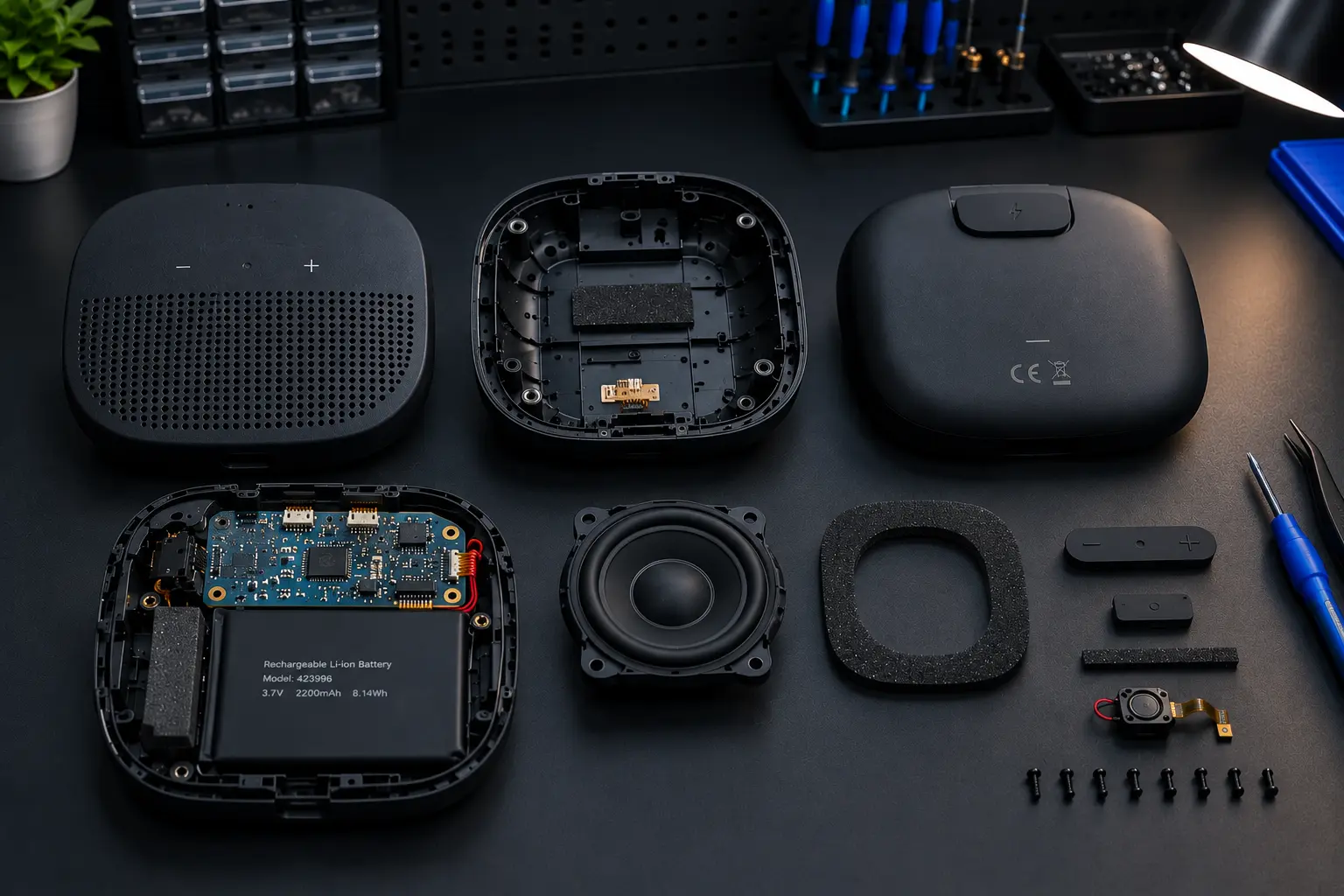
Bose SoundLink Micro 2nd Gen opened for repair
SoundLink Micro On The Bench

What Gets Tested

  • USB-C port and charging circuit
  • Battery health and runtime
  • Power button and start-up behaviour
  • Driver output at low and high volume
  • Bluetooth pairing and range
  • Microphone during calls
  • Signs of moisture or corrosion inside
Symptoms We See

What Goes Wrong With The SoundLink Micro

Spot your speaker's problem below. Several of these look alike from the outside, so the unit is tested before anything is decided.

Not Charging

No charging light, a cable that must be held at an angle or charging that keeps stopping.

Completely Dead

No response to the power button, even after being left on charge for hours.

Battery Drains Fast

Runs for a fraction of the time it once did or switches off at half charge.

No Sound

Connected and showing as active, yet nothing plays through the speaker.

Crackly or Muffled

Rattling bass, a fuzzy tone or volume that sounds weaker than before.

Pairing Problems

Will not appear on the phone, refuses to connect or drops the link mid-song.

Water or Moisture Damage

Dropped in water, left in the rain or started acting oddly after a splash.

Call Mic Not Working

The other person cannot hear you, or hears you faintly and with noise.

Drop or Impact Damage

Works intermittently after a fall, or a button and connector feel loose.

Bose SoundLink Micro 2nd Gen internal board close-up
Inside The Speaker
Before You Give Up On It

A speaker that will not charge is often a port or battery problem.

The most common failures in a portable speaker are also the most fixable: a worn charging port, an aged battery or a connector knocked loose by a drop. Treating these as a write-off would mean throwing away a speaker that still has plenty of life.

We confirm what has failed, explain what the repair involves and let you weigh it against the price of a new speaker.

  • Cable and charger ruled out first
  • Port, battery and board assessed separately
  • Moisture and corrosion looked for
  • You weigh repair against a new speaker
BEFORE YOU DECIDE

Repair Or Replace? Get The Facts First

A portable speaker can be worth repairing or not, depending on what has failed. Here is how the two paths differ.

WITHOUT A CHECK

Buy A New Speaker

Cost Full price of a new unit
Knowing The Cause Never found out
Old Speaker Ends up discarded
Risk Same habits, same failure
BOSE SERVICE OPTION
TEST FIRST

Diagnose, Then Decide

Cost Quoted after testing*
Knowing The Cause Confirmed on the bench
Old Speaker Kept in use if repairable
Approach Only the failed part is fixed
Note: *The estimate depends on the fault found and the part involved.
The Steps

Four Steps Back To Music

01

Tell Us What Happened

Mention the symptom, and any drop, spill or charging habit that might matter.

02

Open & Inspect

Port, battery, board and driver are checked one by one for the real fault.

03

Repair Advice

You are told what failed, whether it is worth repairing and what it would cost.

04

Charge & Play Test

After repair it is charged, paired and played before it goes back to you.

Our Work

SoundLink Micro Repair Gallery

Photos from the bench: how speakers arrive and how they leave.

Our Approach

Honest Checks Before Any Repair

Simple Causes Ruled Out

Cable, charger and phone settings are checked before the speaker is blamed.

Charging Specialists

Port and charging-circuit faults, the most common failure, get close attention.

Moisture Awareness

Hidden corrosion is looked for, not just the visible symptom.

Worth-It Advice

If repair does not make sense, you will hear that plainly.

Good To Know

SoundLink Micro Repair FAQ

Both are possible, so a different cable and charger are tried first. If it still does not charge, the USB-C port, the charging circuit or the battery itself is inspected to find which part has failed.

A deeply discharged battery, a failed power switch, a damaged charging circuit or moisture inside the unit can all cause this. The speaker is opened and tested to see which one applies.

Short runtime usually means the battery has aged, though a fault in the charging or power circuit can mimic it. After testing, we can tell you whether the battery or the board is responsible.

It is better to stop using it and let it be inspected. Water that reaches the charging port or board can cause corrosion over time, even after the speaker seems to dry out and work again.

The Bluetooth section and supporting circuitry are tested. Your phone and its paired-device list are ruled out first so that a setting is not mistaken for a hardware fault.

Often the cause is a damaged driver, an amplifier problem or a loose internal connection. Testing at different volumes helps separate these, and shows whether a repair makes sense.

A dependable figure is only possible once the fault is known. The charge depends on the part involved and the work needed, so the speaker is tested before an estimate is given.

No. BOSE SERVICE is an independent repair business. It is not affiliated with, sponsored by or authorized by Bose Corporation unless specifically stated otherwise.
Speaker Giving Trouble?

Let's get your SoundLink Micro playing again.

Tell us what it is doing and we will suggest the sensible next step.

BOSE SERVICE is an independent repair business. It is not affiliated with, sponsored by or authorized by Bose Corporation unless specifically stated otherwise.